Introduction
LinkedIn has over 1 billion members worldwide, making it the largest professional network on the planet. For B2B marketers, that scale is hard to ignore: according to LinkedIn Marketing Solutions citing Wpromote's State of B2B Marketing Report, 62% of B2B marketers say LinkedIn generates leads at more than 2x the rate of the next-highest social channel.
The problem isn't the platform. It's how most companies use automation on it.
Too many teams blast generic connection requests to anyone with a relevant job title, over-automate until LinkedIn flags their account, or hand off 500 connection acceptances to sales as "leads." None of that moves the needle.
These 5 tips cover what actually works: tighter targeting, smarter sequences, and the metrics that separate healthy campaigns from ones burning your sender reputation.
Key Takeaways
- Define your ICP with precision before automating anything — targeting the wrong people at scale just scales the problem
- Personalization goes beyond first name — role context and company signals lift response rates meaningfully
- Automate lead capture and follow-up sequences, and sync to your CRM immediately so no prospect goes cold
- Sales and marketing must agree on what a "qualified lead" actually means before a campaign launches
- Track connection acceptance rate, message response rate, and lead-to-meeting conversion — not raw volume alone
Tip 1: Define Your Ideal Customer Profile Before Automating Anything
Automation amplifies your targeting. If your ICP is vague, you're not just sending a few bad emails — you're sending hundreds of them daily to people who will never buy.
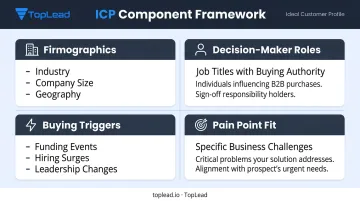
Top-performing B2B teams build campaigns around tightly defined ICPs that include:
- Firmographics: Industry, company size (employee count and revenue range), and geography
- Decision-maker roles: Specific job titles with buying authority, not just anyone in a department
- Buying triggers: Growth signals like new leadership, funding rounds, hiring surges, or tech stack changes
- Pain point fit: A specific business challenge your solution actually solves
Translate Your ICP Into LinkedIn Targeting Filters
LinkedIn's filters let you layer multiple attributes to reach the exact audience worth automating toward. The most effective combinations:
- Job function + seniority level (narrows to decision-makers, not just practitioners)
- Industry + company headcount (eliminates companies too small or too large to convert)
- Geography + department (useful for territory-based sales teams)
Don't stop at one contact per company. Gartner estimates the typical B2B buying group involves 6 to 10 stakeholders. Your automation should map the buying committee — reaching a CFO, an HR director, and an operations lead within the same target account gives you more paths to a productive conversation.
Build Separate Sequences for Different Personas
A single sequence sent to a CFO and an HR director will underperform for both. A CFO cares about cost predictability and risk. An HR director cares about employee experience and compliance. Same product, entirely different conversation.
Build persona-specific message tracks so automation feels contextually relevant to each recipient's actual concerns.
TopLead's U.S.-based SDR teams structure campaigns around this same foundation: ICP definition — including budget readiness, authority level, and buying triggers — before any outreach begins. Getting this step right is what separates sequences that book meetings from sequences that burn your prospect list.
Tip 2: Personalize Your Outreach at Scale
LinkedIn automation works best when it delivers relevant, individualized messages to the right people — at a pace no human team could sustain manually.
Personalization isn't optional here. Generic connection requests read as spam. Prospects check your profile, scan your message, and decide in seconds.
Use Dynamic Variables Beyond Just First Name
Most automation tools support dynamic text replacement. Use it for more than "Hi {{FirstName}}." Effective personalization signals include:
- Job title or function references ("As someone leading operations at a mid-sized manufacturer...")
- Company name in a specific context, not just as filler
- Shared group membership or mutual connections
- Recent company news or growth signals (a new office, a funding announcement, a new hire)
Generic: "Hi Sarah, I'd love to connect and share how we help companies like yours."
Personalized: "Hi Sarah — saw that [Company] just expanded into three new markets. Curious whether the compliance piece is creating any headaches on the HR side."
The second message costs one extra minute to craft at the template level. At the individual level, it's automated — and it reads like you actually did your homework.
Warm Up Your Prospects Before the Ask
Engaging with a prospect's content before sending a connection request — liking a post, leaving a thoughtful comment — noticeably improves acceptance rates. Automation tools can schedule these micro-engagements to run in the days before outreach.
Include value in your first touchpoint. Buyers consume information well before they're ready to engage, so showing up with something worth reading sets you apart from the pitch-first approach. Strong first-touch options include:
- Sharing a relevant insight tied to their industry or role
- Referencing their recent content or a company milestone
- Offering a quick-use resource (a checklist, benchmark, or short framework)
- Asking a specific, informed question rather than a generic opener
Balance Automation with Human Touchpoints
A practical guideline: automate early-stage outreach (connection requests, first message) with heavy personalization. Once someone responds, a human takes over.
Call this the automation threshold: the moment automation hands off to a sales rep who can read the room, handle objections, and actually build a relationship. TopLead's model reflects this — American SDRs re-engage prospects using CRM data, email engagement history, and intent signals, ensuring the human touch arrives at the right moment, not just at a fixed sequence step.
Tip 3: Automate Lead Capture, Follow-Up Sequences, and CRM Integration
Even well-crafted outreach fails if the operational infrastructure isn't built to capture and act on engagement quickly. Research from a 2011 Harvard Business Review study found companies that contacted prospects within one hour were nearly 7x more likely to have meaningful conversations than those who waited longer. Engaged prospects go cold fast.
Leverage LinkedIn Lead Gen Forms
For paid LinkedIn campaigns, Lead Gen Forms auto-populate contact details directly from a member's profile, removing friction from the conversion process entirely. LinkedIn reports that Lead Gen Form campaigns average a 13% conversion rate, compared to roughly 4% for traditional landing pages.
Integrate these forms directly with your CRM via HubSpot, Salesforce, or Zapier so leads route automatically without any manual export step.
Build Multi-Step Follow-Up Sequences
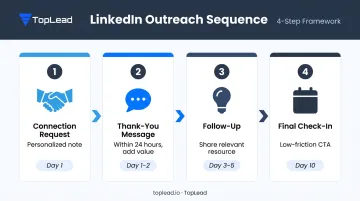
A well-structured LinkedIn follow-up sequence for organic outreach typically looks like this:
- Connection request — personalized note referencing a specific detail about their role or company
- Thank-you message (within 24 hours of acceptance) — add value, don't pitch
- Follow-up at day 3-5 — share a relevant resource or insight tied to their pain point
- Final check-in at day 10 — low-friction CTA (schedule a 15-minute call, download a resource)
Space messages to avoid appearing automated or spammy. And critically: sequences must stop the moment a prospect responds or opts out. Continuing automation past that point is one of the fastest ways to get your account flagged.
Sync Leads Into Your CRM Immediately
Real-time CRM syncing ensures no engaged prospect falls through the cracks. When a lead enters your CRM at the moment of engagement, your sales team sees the full interaction history before reaching out — and that context changes the quality of the first conversation.
Key fields to sync include:
- Lead source and campaign attribution
- Sequence step at conversion
- Engagement history and message log
- Qualification status
TopLead integrates with Salesforce, HubSpot, Pipedrive, and Close.io, delivering appointments directly into US client calendars alongside full contact history and lead notes — so sales reps walk into every conversation prepared.
Tip 4: Align Sales and Marketing on What a Qualified LinkedIn Lead Actually Looks Like
Here's a scenario that plays out constantly: marketing hands over everyone who accepted a connection request as a "lead." Sales ignores the list. Each team blames the other.
On LinkedIn, this misalignment is especially costly because the top of the funnel looks active even when it isn't producing qualified pipeline.
Define MQL vs. SQL Before the Campaign Launches
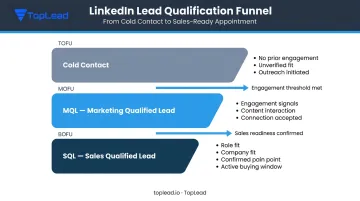
- MQL (Marketing Qualified Lead): A prospect who has engaged with content, accepted a connection, or responded to an initial message — interested, but not yet sales-ready
- SQL (Sales Qualified Lead): A prospect who meets defined criteria around role, company fit, intent, and has agreed to a sales conversation
Both teams need to agree on what moves someone from one category to the other before anyone touches the automation settings.
Map out the specific behaviors and attributes that move a LinkedIn contact from cold → MQL → sales-ready appointment. Typical criteria include:
- Job title and seniority level
- Company size and industry fit
- Engagement signals (reply to a specific message or content piece)
- Confirmed pain point or active buying window
This is the structure TopLead builds into every campaign — qualification criteria are agreed upon with clients before outreach begins, so every delivered appointment meets a pre-defined standard rather than a vague "interested" tag in the CRM.
Set up shared CRM dashboards so both teams see the same pipeline data. When accountability is tied to shared visibility, optimization conversations stay focused on what the numbers actually show — not on whose version of the numbers is right.
Tip 5: Track the Right Metrics and Keep Optimizing
Vanity metrics — connection count, message volume, follower growth — tell you nothing about campaign health. The metrics that actually matter:
| Metric | What It Tells You |
|---|---|
| Connection acceptance rate | Whether your targeting and profile are credible |
| Message response rate | Whether your messaging resonates with this audience |
| Lead-to-meeting conversion rate | Whether engaged prospects are actually sales-ready |
| Sequence drop-off rate by step | Where your sequence is losing people |
| Cost per qualified lead | Whether the campaign economics make sense |
For context, Expandi's 2026 dataset of 13.2 million connection requests reports an average 28.5% connection acceptance rate and 10.4% message reply rate across organic LinkedIn outreach. These are vendor benchmarks, not official LinkedIn figures, but they give you a reasonable reference point for evaluating your own campaigns.
Test and Optimize Systematically
A/B test one variable at a time: the subject line of your first message, CTA wording, time of send, or personalization angle. Change two variables simultaneously and you can't tell which one drove the result.
Let campaigns run long enough to collect statistically meaningful data before drawing conclusions. Running 3-4 variations simultaneously works well — just make sure each variant reaches enough recipients before you declare a winner.
TopLead's optimization process follows this same logic: subject lines, CTAs, and outreach timing are tested continuously, with winning variants identified through response rates and booking rates, then applied to ongoing campaigns. Even small changes — switching from "Book a Demo" to "Schedule a Strategy Call" — can move conversion rates meaningfully.
Over time, the pattern becomes clear: certain audience segments, message angles, and sequence structures consistently outperform others. The goal is to find those combinations faster — and scale them before the window closes.
Common LinkedIn Automation Mistakes That Kill Efficiency
Automating Too Aggressively
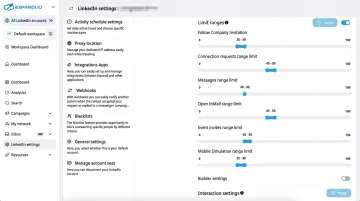
LinkedIn enforces invitation limits and actively monitors for behavior that resembles spam — high send volumes, rapid-fire sequences, and identical messages at scale. Exceeding safe thresholds can result in account restrictions or messages that are delivered but never seen.
To stay within safe operating limits:
- Respect LinkedIn's policies against scraping and unsolicited commercial messages
- Use tools with configurable daily send caps
- Vary your sending intervals to avoid triggering spam detection
Treating Automation as a Replacement for Genuine Engagement
Automation handles the volume. Actual conversations still require a person. Automated messages that ignore responses, skip meaningful follow-up, or never deliver real value will damage your brand reputation faster than no outreach at all.
Once a prospect engages, respond with context and genuine interest in their situation — not another templated sequence.
Launching Campaigns With an Incomplete Profile
Every prospect you contact will look at your LinkedIn profile before deciding whether to accept or reply. A generic headline, a sparse summary, and no social proof undo every personalization effort in your messages.
Before running any campaign, make sure your headline, summary, and experience section all speak directly to how you help your target audience. Treat your profile as the landing page for your outreach — because that's exactly how prospects use it.
Frequently Asked Questions
Is LinkedIn automation safe to use for B2B lead generation?
Automation is safe when it stays within LinkedIn's Terms of Service — meaning it avoids scraping, respects invitation limits, and doesn't send irrelevant commercial messages to strangers. Tools that mimic human behavior with natural delays carry less risk than bulk scrapers, but no third-party automation is entirely without policy exposure.
How many connection requests can I safely send per day on LinkedIn?
LinkedIn confirms that invitation limits exist and that exceeding them triggers temporary restrictions, typically lasting one week. No official LinkedIn source publishes a specific weekly cap, so stay conservative — most practitioners recommend staying well below 20 per day and varying your send intervals to avoid triggering automated detection.
What is the difference between an MQL and SQL in LinkedIn lead generation?
An MQL on LinkedIn typically means a prospect who has engaged with your content, accepted a connection, or replied to an initial message. An SQL means that prospect also meets defined criteria around role, company fit, buying intent, and willingness to have a sales conversation. They're ready to talk to sales, not just curious.
How do I qualify leads that come through LinkedIn automation?
Define your qualification criteria before launching: role, seniority, company size, and pain point relevance. Use lead scoring in your CRM to rank prospects by fit, and have a human review any lead before it reaches sales. Automation surfaces prospects — your qualification criteria determines which ones are worth pursuing.
Can LinkedIn automation replace a dedicated SDR team?
No. Automation handles volume and consistency well, but it can't replicate the judgment, contextual reading, and relationship-building that skilled SDRs provide. It works best at early-stage touchpoints and surfacing engaged prospects, while SDRs handle qualification, objection handling, and conversion.
What metrics should I track to know if my LinkedIn lead generation is working?
Track these four metrics by campaign segment — not just overall:
- Connection acceptance rate
- Message response rate
- Lead-to-meeting conversion rate
- Cost per qualified lead
Segmented tracking reveals which audiences and messages are working and which are pulling your averages down.